RateSwap Pricing Tables With Toggle Docs
File Structure:
After the purchase of the RateSwap Pricing Tables With Toggle, you’ll get the following files.
- RateSwap Pricing Tables With Toggle.json file which contains all 5 layouts JSON file Individually.
- License.txt
Importing JSON File to Divi Library: –
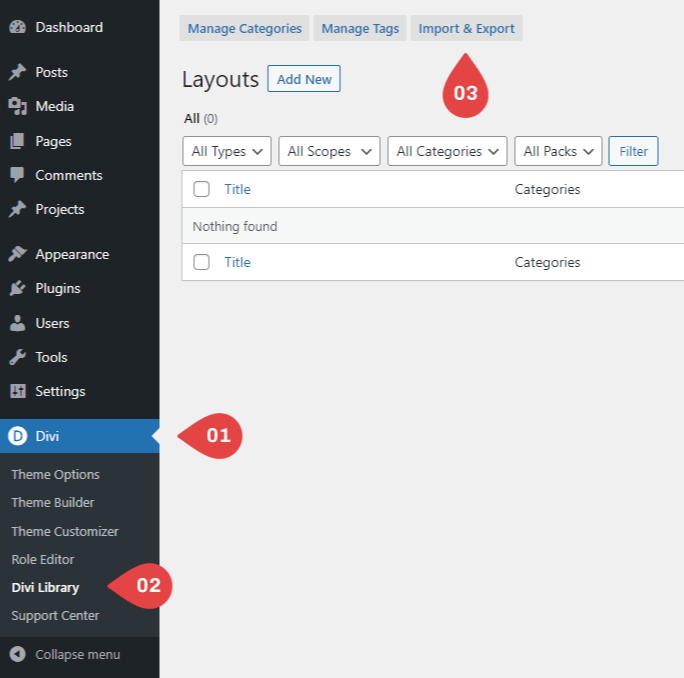
- Navigate to Divi > Divi Library.
- Click on “Import & Export tab”.
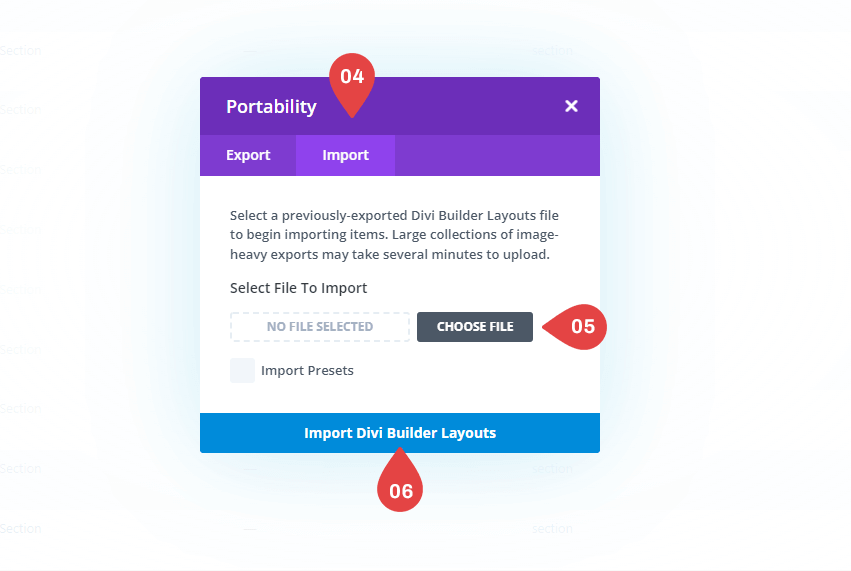
- Select “Import” from the pop-up.
- Click “Choose File” and select the JSON file from your computer.
- Once the JSON layout is selected, click “Import Divi Builder Layouts” and wait for the import process to complete.
- The layouts will be imported to your Divi Library.
How To Use Divi Library Items ?
When you successfully import our RateSwap Pricing Tables With Toggle.json file then you will see 5 layouts Individually in your Divi Library.

Step 1 – Apply Divi Library Layouts to Your Page :-
1. Create a page (go to Pages → Add New) or edit an existing one
2. Use The Divi Builder
3. After choosing the Divi builder option, it will display 3 choices from which to select, “BUILD FROM SCRATCH”
4. Click the portability Blue Plus Icon To Add New Section then select Add From Library
5. Locate your layout, then click the Use This Section button to load the layout.

Note: After import the section layout you should must be click on “Save Changes” button. Otherwise your layout will not be visible on your page.
Additional Customizations for Pricing Table 5:
If you’re using Pricing Table 5 on your website, please refer to the supplementary documentation. It includes two sections: one for desktop and another for tablet and mobile devices.
Desktop Part:

Tablet & Mobile Part:

Note: If you make any changes to the desktop version, be sure to manually update the tablet version as well. The mobile version will update automatically based on the tablet layout.
Please Do Not Delete this
Problems while importing the layout?
If the importing process stops at 100%, or you have another problem, please make sure that you deactivate security plugins like Wordfence while importing. Then it should work fine.
Customer Support
If you encounter any issues, please don’t hesitate to get in touch with us.
- Technical Support – Submit A Ticket
- Email Support – [email protected]